Every dollar,
beautifully accounted for.
The money side of your wedding, in one calm place. Set a total and a guest count and the planner lays out a realistic split you can reshape with a slider, shows what each guest really costs, and keeps every deposit and every family contribution in view. A real interactive app, not a printable.
Instant download · Opens in any browser · No account, no subscription
- Move one budget line and the rest make room, so it always adds up
- Cost per guest updates live as the guest list grows or shrinks
- Parents can see exactly where their contribution goes
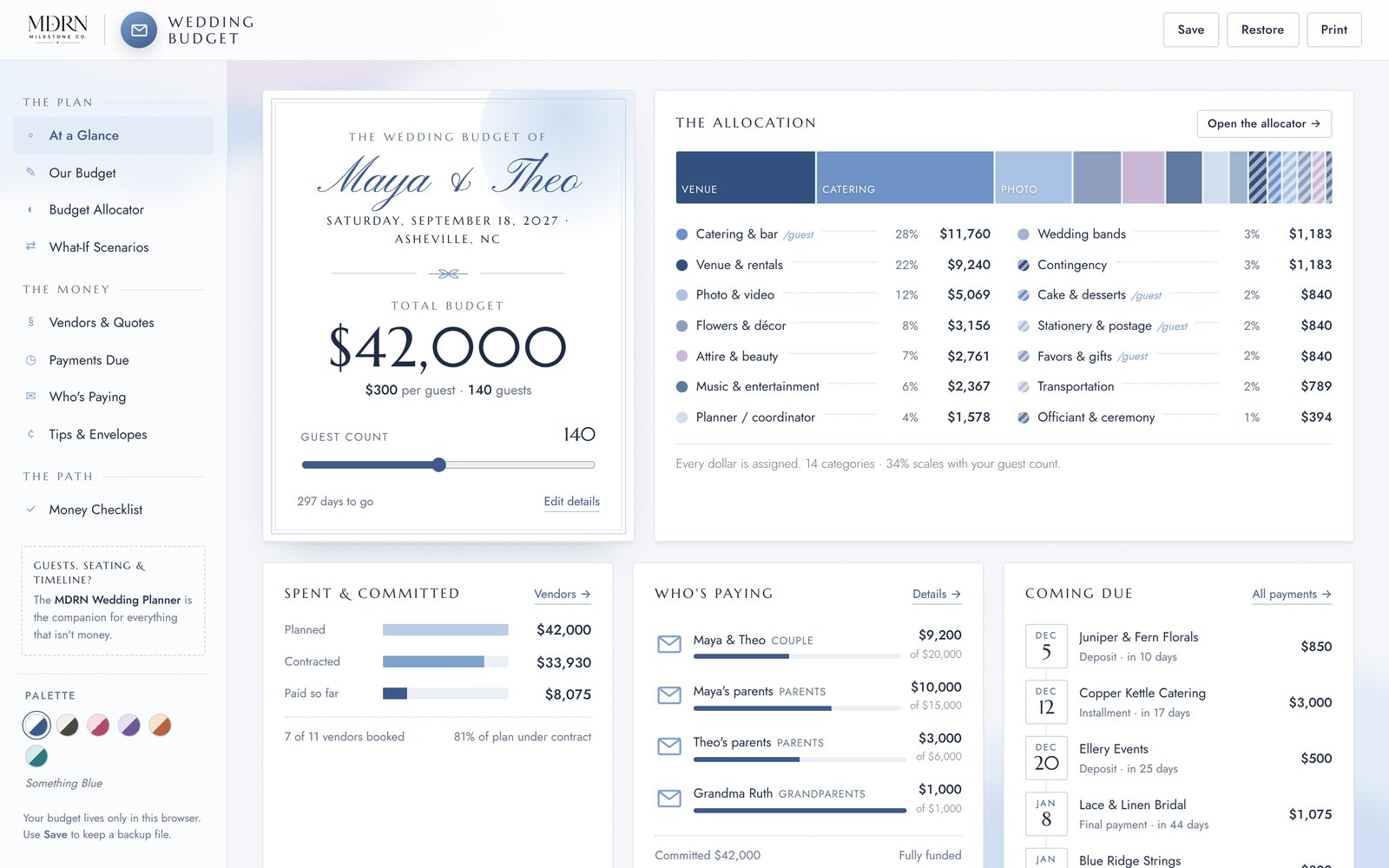
Nine sections, all about the money.
Guests, seating and the day-of timeline belong in a wedding planner. This one does the part a spreadsheet does worst: where every dollar goes, and when.
- ◆At a Glance. An invitation-style card with your names, date, total and cost per guest, beside a ribbon of your whole budget, what you've spent and signed, who's contributed, and what's due next.
- ◆Budget Allocator. Every category on its own slider. Raise photography and the flexible lines quietly make room, so the plan always matches your total. Lock anything that's settled.
- ◆Cost per guest. Catering, cake, stationery and favors are priced per head. Drag the guest count and they re-price on the spot, with the true cost of each guest shown as you go.
- ◆What-If Scenarios. Save "140 guests, Saturday" and "90 guests, Friday" and compare them line by line before anyone commits.
- ◆Vendors & Quotes. Every quote with its estimate, contracted price and status. Once a vendor is booked, the real number shows up next to the plan.
- ◆Payments Due. Deposits, installments and final payments laid out month by month, with days to go, overdue flags and who is covering each one. Print the schedule for the fridge.
- ◆Who's Paying. What each family offered, what has arrived and what's still to come, plus the monthly amount the two of you need to save to finish your share in time.
- ◆Tips & Envelopes. The day-of cash every budget forgets, with typical amounts for each vendor and a note of who hands each envelope over.
- ◆Money Checklist. From opening a joint wedding account a year out to getting deposits back after the day.
Watch it work.
Fill in two names and a number, change the whole look in a tap, then drag the guest count and watch every per-guest line re-price.
A quick look — the real planner does the rest.
Six stationery looks. One tap.
Soft watercolor washes on cotton-paper white. Switch the whole app anytime; your numbers stay exactly where they are.
Numbers that move together.
In a spreadsheet, adding twenty guests means fixing six cells and hoping the total still adds up. Here the plan rebalances itself, the cost per guest updates, and the payment calendar keeps every date in order. It all stays on your own device: no account, no login, and a plain backup file you can share with your partner or parents.
- wedding-budget-planner-v1.html — your complete interactive planner
- Getting Started Guide — a 6-page PDF walkthrough of every section
- Free updates to the file, forever

Every dollar, beautifully accounted for.
MDRN Milestone Co.Questions, answered.
It's an interactive app — a single HTML file that runs in your browser. It also prints a budget summary, a payment schedule and a tip envelope list.
Onto your own device only. The planner has no server and sends nothing anywhere. To keep a copy, click Save and a small backup file downloads to you.
Yes. Send them your backup file; they open their own copy of the planner, click Restore, and see the same plan, including exactly what each contribution is covering.
It handles the money only. Guests, seating and the day-of timeline live in our Wedding Planner, which pairs with this one.
Yes — laptop, tablet, or phone, in any modern browser.
Free, forever. When we improve this planner, just re-download it from your original purchase link — no extra charge. Click Save in your current planner first, then Restore in the new version to carry your data over.
In their words.
No reviews yet for the Wedding Budget Planner. If you've used it, yours could be the first.
Already tracking with this one? Leave an honest review. We read every one before it's posted, and we only post reviews from verified buyers.
Leave a ReviewNot ready today? Join the list — new planners, quiet launches, and the occasional discount. No spam, ever.